 Postcard Video
A short guide
How to use a teleprompter with your iPhone's front camera
By Adam Raabe, who makes Postcard Video.
The short answer: put the words as close to the front camera as you can, keep each line short, make the text big, and don't let it scroll at a set speed. Then look at the lens, not at your own face.
The Camera app that comes with the phone shows you a big mirror of yourself and nothing else. So a lot of people prop a note beside the phone and glance off to the side, and the viewer sees every glance. A teleprompter fixes that.
1. Put the words right by the lens
The front camera is a small dot at the top of the screen. The closer your words are to it, the closer your eyes stay to it. At arm's length, text within an inch or two of the lens still looks like eye contact. Text at the bottom of the screen, or on a second device, reads as looking down.
2. Keep each line short
One thought per line. Three to five lines for a short video. A paragraph makes you scan, and scanning is what the camera catches. You can read a short line at a glance and say it to the lens.
3. Make the text big
You're a full arm away from the phone. Use the biggest text that still fits a line or two. If you're squinting, it's too small.
4. Don't scroll at a set speed
Most teleprompter apps scroll the text at a speed you pick. Then you're either chasing it or waiting for it, and it shows. Two better ways: points you glance at and talk from, or a prompter that follows your voice and moves on when you do.
5. Look at the lens, not your face
Check how you look once. Then look at the lens for the rest of the take. A prompter by the lens makes this easy, because the words are already there.
6. Pause instead of starting over
Lost the line? Pause, find it, carry on. Short videos don't need one perfect pass.
How Postcard Video does it
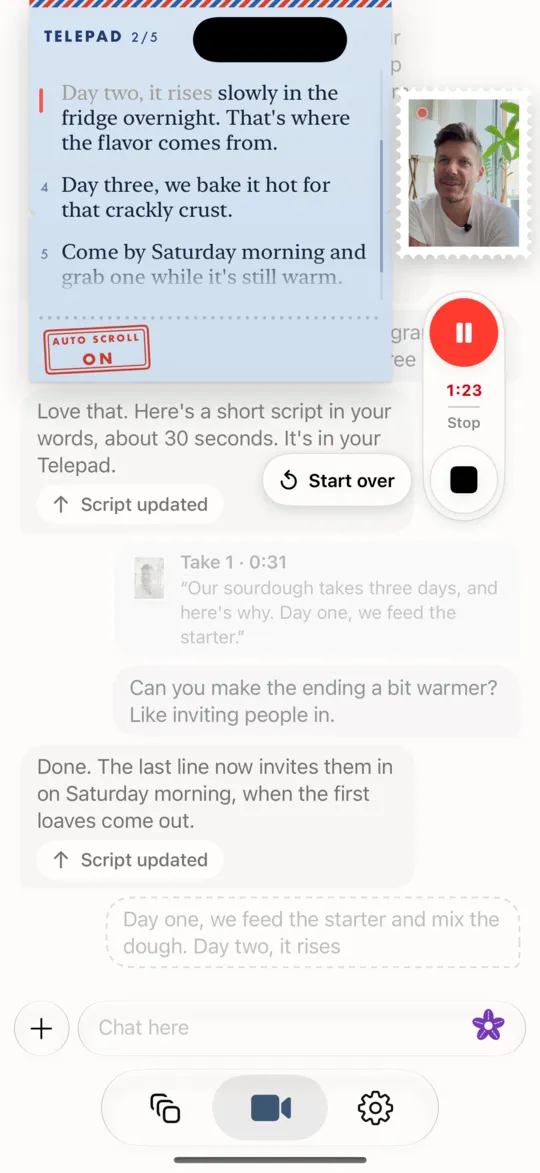
I built Postcard Video for myself around these. Its Telepad sits right by the camera and listens on the phone: it ticks off each line as you say it and scrolls along with you, so there's no speed to set. Two buttons make the text bigger or smaller, and you can turn auto scroll off. Agnes, the chat, writes your lines in your words, or you type your own. Your picture is a small stamp, not a mirror, and the red button pauses with one tap.
Free on iPhone through Apple's TestFlight. iOS 26 or later. No account.
Questions
Does the iPhone have a built-in teleprompter?
The Camera app that comes with the iPhone doesn't show you notes or a script while you film. For that you need a teleprompter app, or a note right by the lens.
Can I use a teleprompter with the front camera?
Yes, and it's the easiest place for one: the words and the lens are on the same side of the phone. Keep the words right by the lens.
How do I read a script on camera without looking like I'm reading?
Short lines, big text, right by the lens, and let the words follow you instead of scrolling on their own. Talk from points when you can. It sounds more like you.
Does the Telepad in Postcard Video need the internet?
The Telepad's listening happens on the phone itself. Agnes, the chat that writes your lines, needs the internet to answer.
More
Nervous on camera? How to film yourself when you're camera-shy. Stuck on the words? What to say in your video.